

If you follow this website, you'll know that I'm mostly into long-term investing.
I'm not sitting in front of trading charts all day, trying to catch every move in the market. That's not really my style. I'd say that around 90% of my assets are invested for the long run, and only a much smaller portion is used for shorter-term or higher-frequency trading.
But regardless of whether you're a long-term investor, a casual market watcher, a Bitcoin holder, or someone who simply likes knowing what's going on, I do think there’s value in keeping an eye on a few major instruments.
For example, if you’re invested in the US market, it makes sense to keep an eye on the S&P 500. If you're interested in crypto, BTC/USD is probably something you glance at fairly often. And if there are a few individual shares you follow, it’s useful to have those prices nearby too.
Not because you need to react to every tick.
In fact, I'd argue the opposite.
For me, it's more about building a gentle awareness of what's happening. Over time, my brain starts to form a pattern. I get a feel for where BTC has been sitting, whether the S&P 500 is having a strong day, whether risk assets are broadly moving up or down, and whether something feels unusual.
That kind of awareness is useful, but I don't want it to become a distraction.
For a long time, I've used a handful of apps and browser tabs to track this sort of thing.
The goal was simple: I wanted to glance at my computer and quickly see the current price of BTC/USD, SPY, and a few other instruments without needing to open a full trading platform.
The problem is that many of the apps I tried were either too buggy, too cluttered, or too expensive for what I needed.
Some were clearly designed for active traders. Others worked well for a while and then became unreliable. A few moved to paid models where the cost felt high relative to the simple job I wanted the app to do.
I didn't need a professional trading terminal. I didn't need alerts, watchlists, news feeds, technical indicators, account syncing, portfolio analysis, or a giant dashboard. I just wanted something small, clean, and always visible.
So I decided to build one myself, and that's how TickBar came about.
TickBar is a simple, lightweight menubar app for Mac. Once installed, it sits quietly in your macOS menubar and shows live price movement for BTC/USD, SPY, and any supported S&P 500 stock tickers you choose to add.
The idea is very simple:
You should be able to glance at the top of your screen and immediately get a sense of what's happening.
Just a clean price display in the menubar.
Example:
BTC $80.8k 0.0% | SPY $737.6 ↑0.4% | TSLA $428.4 ↑4.0%I've spent a fair bit of time working on the layout because with a menubar app, space matters. It needs to be compact enough that it doesn't take over your screen, but useful enough that it actually gives you meaningful information.
I think TickBar is now at a point where it strikes a good balance:
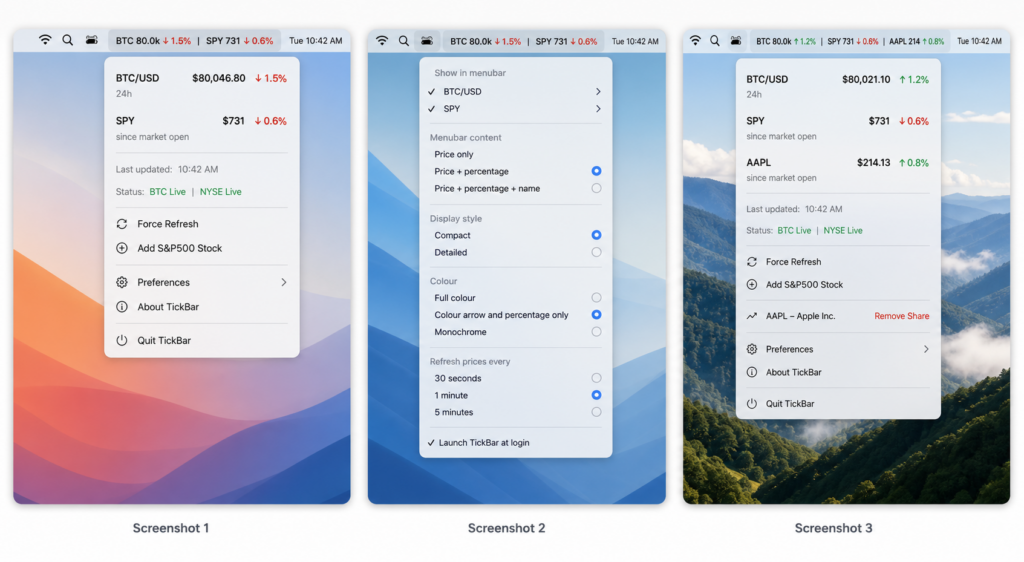
The app shows the main price action directly in the menubar, and then gives you a lightweight dropdown with more detail when you click on it.
The dropdown shows things like current values, percentage movement, when the data was last updated, and the current status of the markets.
For example:
BTC/USD
24h

SPY
since market open

Status: BTC live · NYSE closed
The goal was to make it useful without making it feel like a trading cockpit.
When I was thinking through the app, I kept coming back to one question: What would make this genuinely useful without overcomplicating it? These are the main reasons I think someone might want to use TickBar.

This is the main one.
TickBar gives you the current BTC/USD and SPY prices at a glance while you're working. You don’t need to open a browser, exchange app, trading platform, finance website, or charting tool. The information is just there in the menubar. That might sound like a small thing, but I've found it very useful.
When something is visible but unobtrusive, you don't need to go looking for it. And because you don't need to go looking for it, you're less likely to get distracted.
This was a big motivation for me.
I often found that checking a price would turn into opening TradingView, Yahoo Finance, Coinbase, or some other platform. And once I was there, I'd start looking at charts, timeframes, candles, watchlists, news, or whatever else was on the screen.
Five minutes later, I'd realise I had only wanted to check one number.
TickBar helps avoid that.
It gives you the key signal directly in the menubar. You can see whether BTC is up or down, whether SPY is green or red, and then get back to what you were doing.
That's the sweet spot for me.
Enough information to stay aware, but not so much that it pulls me away from my work.
I like having BTC and SPY side by side because together they give a simple read on market mood. BTC gives a feel for crypto and risk appetite. SPY gives a feel for broader US market direction.
It's not a perfect system, and it's definitely not investment advice, but it gives you a quick sense of what kind of day markets are having.
That's often all I want.
Not everyone needs a full trading dashboard. In fact, most people probably don't.
TickBar is aimed more at people who want lightweight visibility. That could be long-term investors, founders, marketers, finance-curious people, crypto holders, or anyone who likes keeping half an eye on the market while they work.
You might not be trading actively, but you may still want to know:
Is BTC having a strong day?
Is the S&P 500 up or down?
Has a stock I follow moved sharply?
Is the US market open or closed?
TickBar gives you that without making you feel like you need to become a day trader.
Because TickBar lives in the macOS menubar, it's always there when you need it.
It just quietly does its job. That's the kind of software I personally like: small, focused, and useful.
TickBar currently includes:
I've tried to keep the feature set practical.
There's enough flexibility to make the app work the way you want, but not so many settings that it becomes annoying to configure.
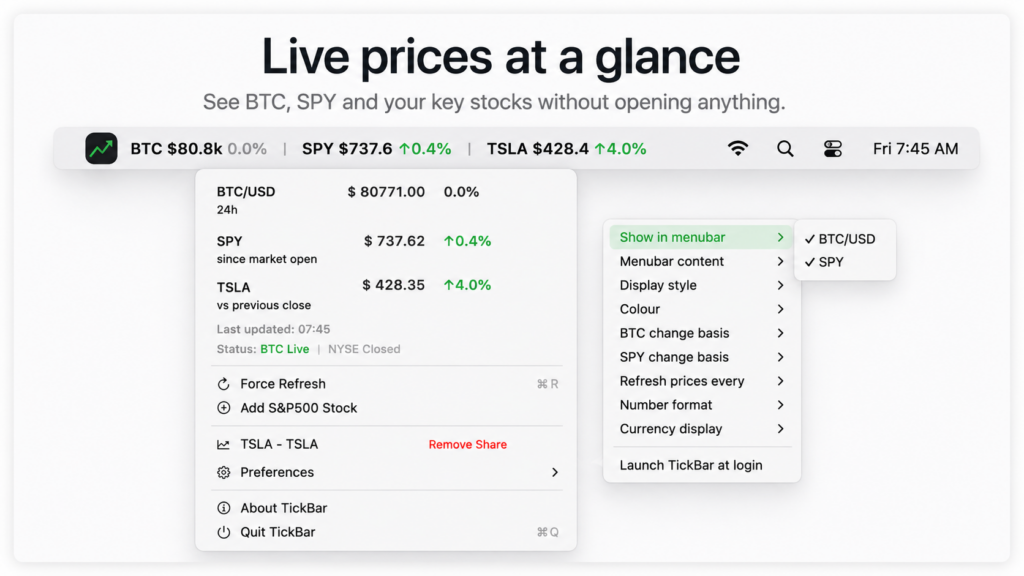
One thing I wanted from the beginning was the ability to choose how much information appears in the menubar.
Some people want the full view:
BTC $80.8k 0.0% | SPY $737.6 ↑0.4%Others may prefer something more compact:
BTC 80.8k | SPY 737.6Or even just percentage movement:
BTC 0.0% | SPY ↑0.4%TickBar includes different display options so you can decide what feels right.
I've personally found that price plus percentage movement is the most useful, because it gives me both the current value and direction of movement in one glance.
I started with BTC/USD and SPY because they are two instruments I personally like having visible. BTC trades continuously, so it's useful to show the 24-hour change. SPY follows US market hours, so it's more useful to compare movement since the market opened, or against a relevant stock-market reference point.
That difference matters.
Crypto and stocks don't behave the same way, so the app allows for different change-basis logic depending on the instrument. BTC is generally shown against 24-hour movement, while SPY and stocks can be shown against market open or previous close, depending on your preference.
TickBar also supports adding S&P 500 stock tickers.
So, if there are a few shares you like to keep an eye on, you can add them to the menubar.
For example:
BTC $80.8k 0.0% | SPY $737.6 ↑0.4% | TSLA $428.4 ↑4.0%I don't think the menubar should become overloaded with dozens of tickers, but having one or two extra stocks visible can be useful.
Again, the goal is glanceable awareness, not a full watchlist platform.
I built TickBar because I wanted it for myself.
That's usually a good sign for a small project. I wasn't trying to invent something complicated or chase a huge product idea. I simply wanted a small utility that did one job well.
I've had the app running on my machine for a few days while making adjustments on the fly. I've tweaked the layout, wording, spacing, colour logic, and dropdown until it felt genuinely useful in my day-to-day workflow.
At this point, I feel it's valuable enough to share.
TickBar is completely free to download.
There's no subscription, no login, and no complicated onboarding. It’s just a small Mac utility for people who want quick market visibility from their menubar. Of course, this is a fun side project, so I'd really appreciate feedback. If you try it and something feels off, or you have an idea that would make it more useful without making it bloated, please let me know.
TickBar is not trying to replace a trading platform.
It's simply a clean little menubar app that helps you stay aware of a few important market signals while you get on with your day.
That's the value for me.
And hopefully, if you're someone who likes keeping an eye on BTC, SPY, or a few favourite stocks, it'll be useful for you too.


