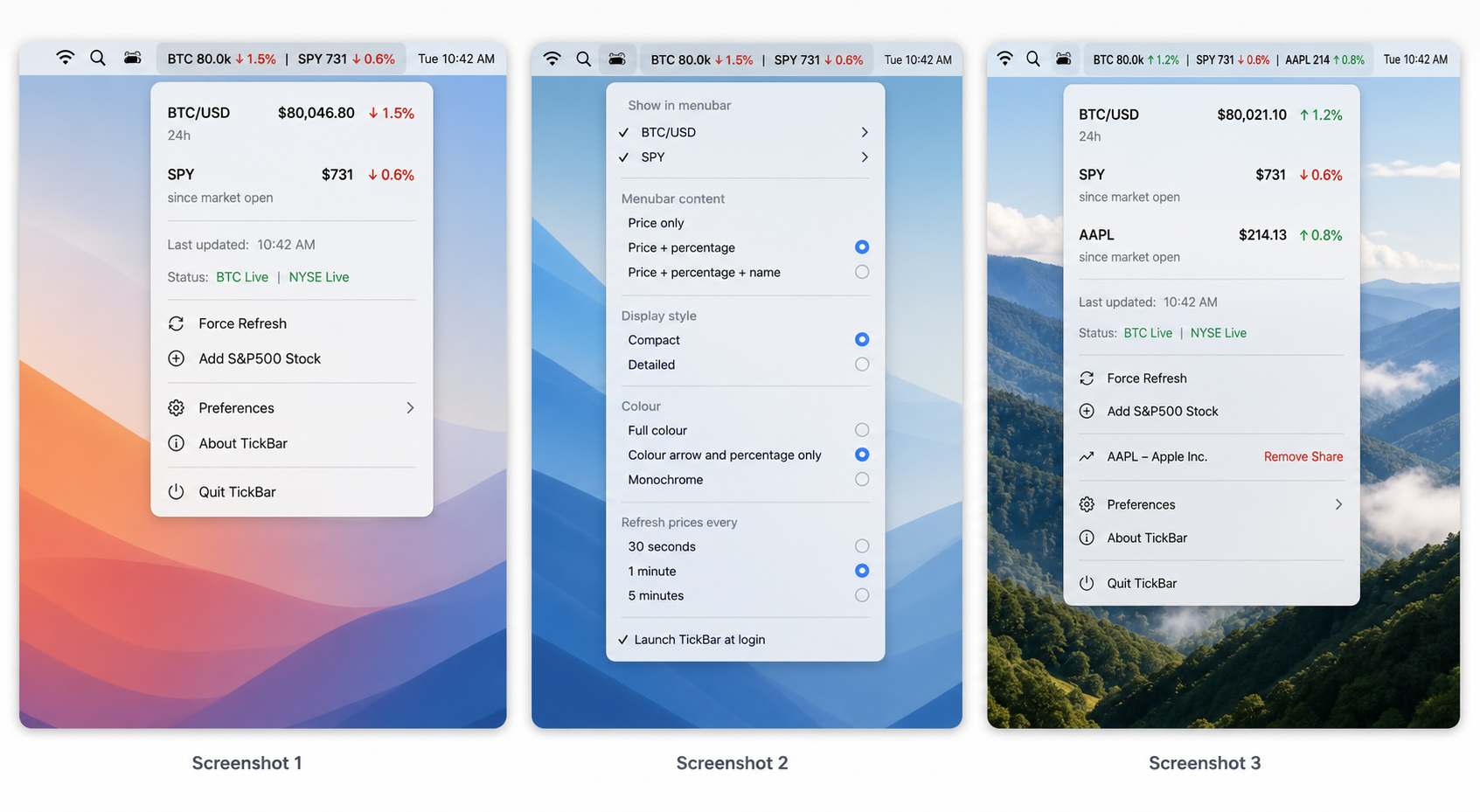
Over the years, I've found that keeping an eye on share and crypto prices, has kept me in tune with my investing strategy. Even as a long term investor, having an idea of how instruments are moving, allows me to keep up to date with the markets in general. I found that of the available apps in the Mac App Store, most had poor interfaces, lots of bugs and tried to squeeze in too many features. It also frusrated me that most of them had a cost but no single feature that warranted a cost. So, I decided to look at what it was that I needed and take the plunge in creating my own app. This took a fair amount of work but I got there in the end, and it only made sense to release it for all of you to use.
TickBar is a clean, lightweight macOS menu bar app that keeps the markets you care about visible at a glance. Built for people who want instant access to live market context without opening a browser, app, or full trading platform, TickBar puts BTC/USD, SPY, and selected S&P 500 stocks directly in your menu bar in a format that stays compact, readable, and useful throughout the day.
By default, TickBar shows Bitcoin and SPY side by side with price and percentage movement in a simple market-style layout. Bitcoin uses 24-hour movement, while SPY and added stocks can be viewed against the market open, previous close, or app launch depending on your preference. During regular US market hours, stock movement is color-coded for immediate visibility. Outside market hours, stock indicators can remain visible while the exchange status is clearly shown, helping you distinguish live trading from after-hours inactivity.
TickBar is designed to stay out of the way while still being customizable. You can choose which instruments appear in the menu bar, switch between price-only, percentage-only, or combined views, control how compact the display is, and decide whether color applies to the full instrument or only the movement indicator. Refresh timing is also configurable, with manual refresh always available from the menu.
The app also supports adding your own S&P 500 stock tickers, so TickBar can become a personalized market strip rather than a fixed BTC-and-SPY utility. Whether you want to watch Bitcoin, track the broader US market, or keep an eye on a handful of key names, TickBar gives you fast, glanceable market visibility from anywhere on your Mac.
TickBar is an ongoing project, so this feature list is going to continue to evolve, but as things stand, here are the features:
- Native macOS menu bar app
- Live BTC/USD price display
- Live SPY tracking
- Support for adding custom S&P 500 stock tickers
- Compact, full, and minimal display modes
- Price-only, percentage-only, or combined menu bar views
- Color-coded movement indicators
- Configurable change basis for BTC and stocks
- Configurable refresh interval, including manual refresh
- Launch at login support
- Lightweight dropdown menu with current status and last updated time
- Clean, glanceable layout designed for all-day use in the macOS menu bar
I've worked hard to make this app look as good as possible. I aimed for a careful balance between displaying enough information but not too much, like many of the other apps. It was a fine balance, but I think I got right: